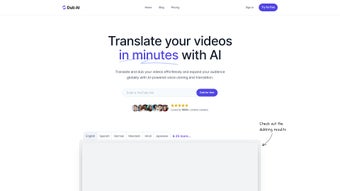

Download Dub AI – AI Video Localization Tool, Translation, Voice Cloning
Overview
Dub AI is an AI‑driven video localization platform designed to break language barriers for creators, marketers, and enterprises. By combining powerful translation algorithms, realistic voice‑cloning technology, and automatic speaker detection, Dub AI lets you turn a single source video into a multilingual library of dubbed content in just three steps. Whether you need to expand a YouTube channel into new markets, localize corporate training material, or create localized ads for over 25 languages, Dub AI offers a secure, fast, and user‑friendly solution.
The tool can handle up to ten speakers at once, preserving the original tone and pacing while providing accurate transcripts and ready‑to‑use audio clips. Its cloud‑based architecture eliminates the need for heavy local processing, making the service accessible from any modern browser on Windows, macOS, Android, or iOS. With an intuitive interface that supports direct URL imports, Dub AI removes the technical friction that usually accompanies video dubbing, allowing you to focus on creative storytelling and brand consistency across borders.
Core Features & Capabilities
- AI‑Powered Translation: Supports more than 25 languages with context‑aware neural translation that maintains nuance and industry‑specific terminology.
- Realistic Voice Cloning: Generate brand‑consistent voiceovers using custom voice models or choose from a library of high‑quality synthetic voices.
- Automatic Speaker Detection: Detects and separates up to ten speakers in a single video, ensuring each voice is accurately matched to the correct character.
- One‑Click Dubbing Workflow: Upload a file or paste a YouTube URL, let the AI translate and dub, then download the finished video with transcripts and individual audio tracks.
- Transcript Export: Receive fully time‑coded transcripts in the target language for subtitles, SEO indexing, or post‑production editing.
- Bulk Processing: Queue multiple videos for simultaneous processing, ideal for large‑scale campaigns or e‑learning libraries.
- Secure Cloud Infrastructure: All uploads are encrypted in transit and at rest, complying with GDPR and other privacy standards.
- Integration Ready: API endpoints allow developers to embed Dub AI’s dubbing engine directly into existing content pipelines.
- Version Control: Keep previous dubbing versions and switch between voice models without re‑uploading the original video.
- Regular Updates: Continuous model improvements and new language additions are rolled out automatically.
These features work together to create a seamless dubbing experience that saves time, reduces costs, and maintains brand identity. The voice‑cloning technology, for example, can replicate a specific presenter’s timbre, making localized videos feel like they were originally recorded for each market. Meanwhile, the automatic speaker detection eliminates the tedious manual labeling that often slows down traditional dubbing workflows. By offering both a powerful UI for non‑technical users and an API for developers, Dub AI caters to a wide range of use cases—from independent YouTubers to multinational corporations.
Installation, Compatibility & How to Use Dub AI
Because Dub AI is a cloud‑based SaaS solution, there is no traditional installation required. All you need is a modern web browser (Chrome, Edge, Firefox, or Safari) and an internet connection. Simply navigate to the official Dub AI website, create a free account, and you’re ready to start dubbing. The platform runs on the following operating systems, all of which are covered by the Windows 10/11, macOS 11+ (Big Sur, Monterey, Ventura), Android 8.0+, and iOS 13+ specifications, ensuring cross‑device accessibility.
Step‑by‑Step Usage Guide
- Upload Your Source Video: Click the “Upload” button to select a local file (MP4, MOV, AVI) or paste a YouTube URL. The system automatically extracts audio and visual tracks for processing.
- Select Target Language & Voice: Choose from the language dropdown and pick a voice model—either a pre‑built synthetic voice or a custom‑cloned voice you have previously trained.
- Configure Advanced Settings (Optional): Adjust speaker detection sensitivity, set subtitle timing preferences, or enable batch mode for multiple files.
- Start the AI Dubbing Process: Hit “Translate & Dub.” Dub AI’s backend queues the job, performs translation, synthesizes speech, and aligns it with the original video timeline.
- Download Results: Once processing is complete, you’ll receive a download link for the fully dubbed video, a separate audio‑only file for each speaker, and a time‑coded transcript in the chosen language.
The entire workflow typically takes between 5 and 15 minutes per minute of source video, depending on language complexity and the number of speakers. Because everything is handled in the cloud, you can start a dubbing job on a desktop and later check the status from a mobile device. For teams, Dub AI offers role‑based access controls, allowing project managers to assign tasks, approve voice‑clone models, and monitor usage quotas. The platform also provides detailed logs and usage analytics, which can be exported for compliance reporting or budgeting purposes.
Pros, Cons & Frequently Asked Questions
Pros
- Fast, three‑step dubbing workflow saves hours of manual editing.
- High‑quality voice cloning preserves brand tone across languages.
- Supports up to ten speakers with automatic detection.
- Extensive language library (25+ languages) with regular updates.
- Secure cloud processing meets GDPR and other privacy standards.
- API access enables integration with existing production pipelines.
- Free tier available for low‑volume users; scalable pricing for enterprises.
Cons
- Dependent on internet connection; large files may require stable bandwidth.
- Advanced custom voice training requires a minimum amount of source audio.
- Some niche languages may still have limited voice model options.
- Pricing can increase sharply for high‑volume batch processing.
FAQ – Your Dub AI Questions Answered
Can I use Dub AI for commercial projects?
Yes. Dub AI offers commercial licenses that include unlimited distribution rights for the generated dubbed videos. Enterprise plans also provide priority support and custom SLA agreements.
How secure is my uploaded video content?
All uploads are encrypted with TLS 1.3 during transit and stored using AES‑256 encryption at rest. Dub AI complies with GDPR, CCPA, and ISO‑27001 security standards.
Do I need a powerful computer to run Dub AI?
No. Because the heavy AI processing occurs on Dub AI’s servers, any device that can run a modern browser is sufficient. This includes low‑end laptops, tablets, and smartphones.
Can I customize the voice tone (e.g., make it sound younger or more formal)?
Yes. The voice‑cloning module includes sliders for pitch, speed, and emotional tone, allowing you to fine‑tune the output to match your brand personality.
Is there a free trial or a freemium version?
Dub AI offers a 14‑day free trial that includes up to 30 minutes of dubbed video. After the trial, you can continue with a free tier that provides limited minutes per month or upgrade to a paid plan for unlimited access.
Conclusion & Call to Action
In a world where video is the dominant medium for communication, Dub AI stands out as a comprehensive, AI‑powered solution that removes language barriers without sacrificing brand integrity. Its combination of fast translation, realistic voice cloning, and automatic speaker detection makes it ideal for anyone looking to scale video content globally—whether you’re a solo creator, a marketing agency, or a multinational corporation. The platform’s ease of use, secure cloud infrastructure, and robust API mean you can start dubbing immediately and integrate the service into larger production workflows as you grow.
If you’re ready to expand your audience, improve SEO with multilingual subtitles, and keep a consistent voice across markets, download Dub AI today. Start with the free trial, test the voice‑cloning capabilities, and experience how a few clicks can turn a single video into a worldwide campaign. For businesses that need higher volumes, contact the sales team for a custom enterprise quote and unlock priority processing, dedicated support, and advanced analytics.
Dub AI delivers a powerful blend of translation accuracy and voice‑cloning realism that few competitors match. Its three‑step workflow dramatically reduces the time needed to launch localized video campaigns, while the secure cloud environment gives peace of mind for sensitive content. The only drawbacks are the reliance on a stable internet connection and the higher cost for large‑scale batch processing, but these are minor trade‑offs for the productivity gains.



.png)



